
Reports and profit
Reports turn your sales, stock and expenses into numbers you can act on. Open Reports from the menu, choose a date range (today, yesterday, last 7 or 30 days, this month, last month or your own dates), and open a report.
Full reports and PDF export need a Pro plan or a trial. The free and Basic plans show today's basics.
The reports
- Sales summary. What you sold in the period, and how many sales.
- Payment collection. Money received.
- Customer ledger and Outstanding customers. Who owes what.
- Top customers and Customer growth.
- Cylinder movement, Stock summary, Cylinder godown and Returns. Where your cylinders went.
- Stock received, Outstanding suppliers, Supplier ledger and Supplier payments. What you bought and what you owe.
- Profit and loss. See below.
Tap a report to see its detail, share it, export it, or save it as PDF.
Profit and loss
This report shows how much you earned over the period. It is also on the web app.
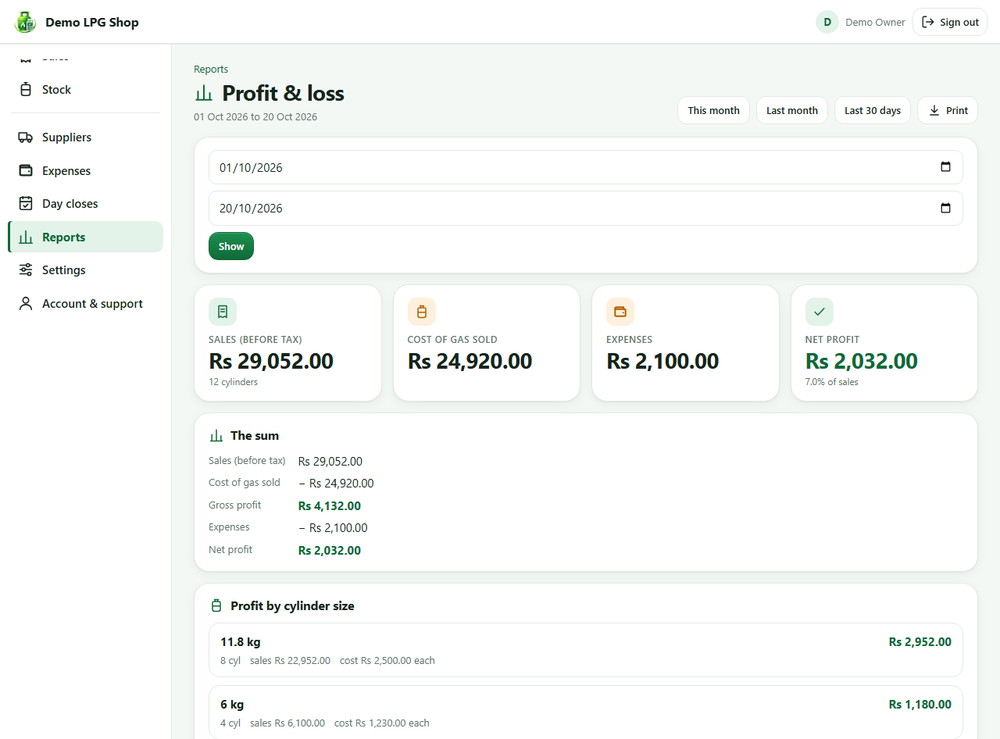
| Line | How it is worked out |
|---|---|
| Sales | What you billed for gas: quantity times price, minus discounts, plus delivery. Tax you collected is not counted as income. |
| Cost of gas sold | Cylinders sold times what each cylinder cost you (the average price of the stock you received). |
| Gross profit | Sales minus cost of gas |
| Expenses | The expenses you recorded in the period |
| Net profit | Gross profit minus expenses |
It also shows profit for each cylinder size, and your profit margin.
What is not part of profit
A separate block lists things that are real money but not profit:
- Amounts you owed suppliers when you started using the app. That gas was bought earlier, so it is not a cost of this period.
- Payments to suppliers. Paying a supplier clears a debt. The cost was counted when the gas was sold.
- Customer payments and customers' opening balances.
If a cylinder size has no cost
For a size you have not received stock for, the report uses the cost price per kg from Settings. If that is empty it estimates from your other sizes and says so. If it has nothing to go on it warns you that profit is too high. To fix it, receive stock with its real price, or enter a cost price per kg in Settings, Cylinder Settings.
Profit on Home
On a Pro plan, Home shows Profit this month. Tap it to open the full report.